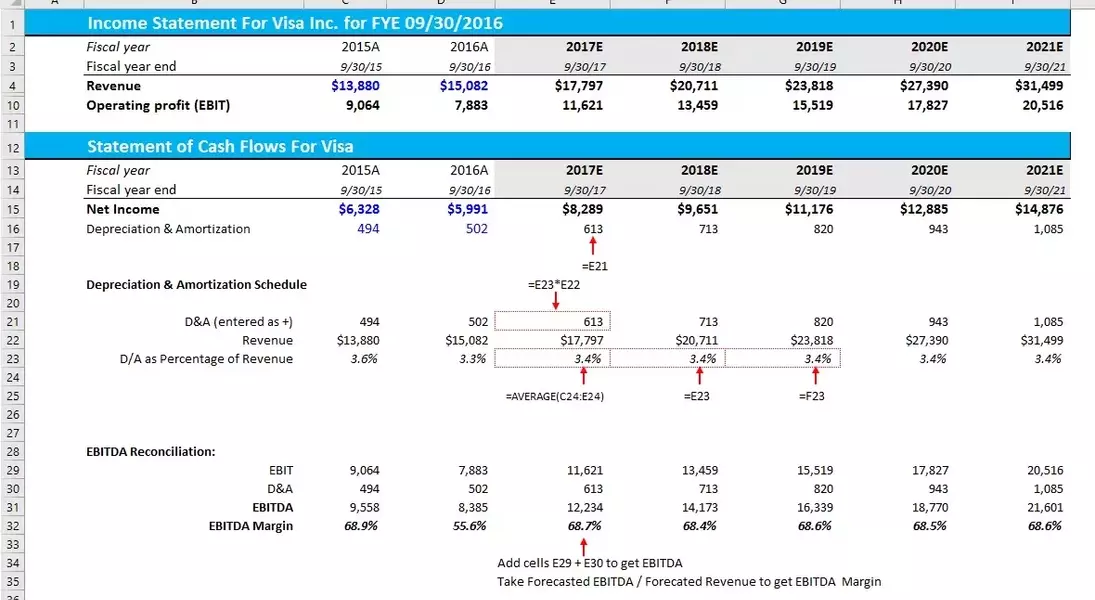
Understanding EBITDA is crucial for assessing a company's operational health, as it offers a clear picture of profitability before the effects of financing, tax policies, and non-cash expenses. This non-GAAP measure focuses solely on a business' core operational returns, making it an invaluable tool for financial analysts looking to compare the performance of different companies within the same sector.
The process of calculating EBITDA and its margin in Excel is straightforward, allowing for rapid and precise financial analysis. By beginning with Earnings Before Interest and Taxes (EBIT) from the income statement—a standard GAAP item—and then incorporating depreciation and amortization figures, which are typically found on the statement of operating cash flows, one can easily arrive at the EBITDA. The EBITDA margin is subsequently calculated by dividing this result by the total revenue for the period, offering a direct percentage that indicates operational profitability. For future projections, analysts can estimate depreciation and amortization based on historical patterns and apply growth rates to revenue, often utilizing consensus estimates as a foundational benchmark.
The EBITDA margin serves as a powerful indicator of a company's ability to generate profit from its primary operations, offering a standardized metric for evaluating businesses with comparable models. While it simplifies inter-company comparisons by stripping away variables tied to capital structure and varying tax situations, it's important to remember that EBITDA should be used in conjunction with other financial metrics for a comprehensive financial assessment. This ensures that the impact of capital expenditures and financing decisions are not overlooked, providing a balanced perspective on a company's overall financial standing.
