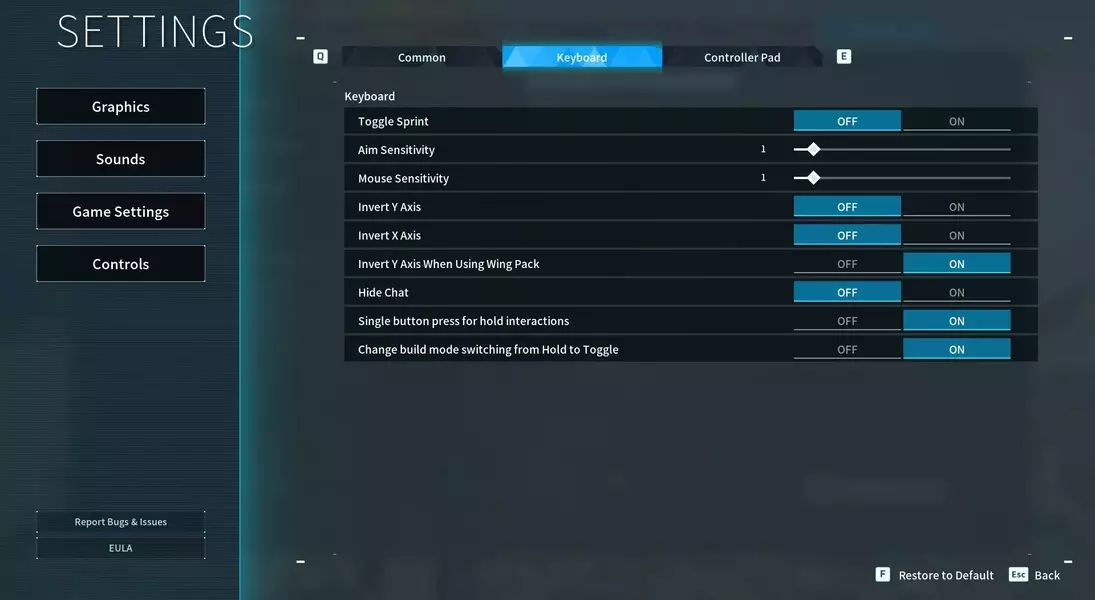

With Palworld's recent 1.0 release attracting a massive influx of players, many are rediscovering the joy—and the grind—of extensive crafting. This guide offers a simple yet effective solution to a common gameplay frustration: the continuous holding of a key for every building and crafting action. By adjusting two specific settings, players can significantly enhance their quality of life in the game, turning tedious tasks into a more streamlined and enjoyable process, preventing digital fatigue for their fingers and allowing for more immersive gameplay.
For those new to the optimized experience, it is advisable to verify these settings at the beginning of each play session, as some players have reported instances where changes do not persist after closing the game. By ensuring these modifications are active, players can truly savor their reclaimed time and mental bandwidth, enabling them to engage more deeply with other in-game activities or even multitask with their mobile devices while their Pals handle the heavy lifting, ushering in a new era of luxurious gaming efficiency.
Effortless Crafting: Liberating Your Fingers in Palworld
For Palworld enthusiasts returning post-1.0 launch, the game's expansive crafting system can be both engaging and physically taxing. Constantly pressing and holding a key for every single crafting or building action—from simple Pal beds to complex structures—can quickly lead to discomfort and fatigue. Thankfully, a straightforward in-game adjustment allows players to bypass this repetitive action, transforming the crafting experience from a chore into a seamless background activity. This simple tweak is a game-changer for those looking to maximize their enjoyment and minimize physical strain during long play sessions, especially given the sheer volume of items required for base development and survival.
To activate this convenience, navigate to the main menu by pressing 'Esc', then proceed to 'Options', and finally 'Game Settings'. Within this menu, locate either the 'Keyboard' or 'Controller' tab, depending on your preferred input method. Here, you will find two crucial options: 'Single button for hold interactions' and 'Change build mode from Hold to Toggle'. It is imperative to switch both of these settings to the 'ON' position. The first option streamlines general world interactions, while the second specifically addresses the persistent 'F' key requirement for crafting and building within your base. Once enabled, confirm your changes by hitting 'Esc' again and selecting 'YES' to save. This modification frees your fingers from tedious button-holding, allowing for a more relaxed and efficient gameplay experience, whether you're focused on resource gathering, exploration, or simply managing your growing collection of Pals.
Ensuring Persistent Comfort: Post-Setting Verification and Benefits
After implementing the critical changes to Palworld's interaction settings, it's prudent to conduct a brief verification at the outset of subsequent gaming sessions. While these adjustments are designed to persist, some players have occasionally encountered instances where the modifications revert to default. A quick check of the 'Options > Game Settings' menu at the start of your playtime ensures that 'Single button for hold interactions' and 'Change build mode from Hold to Toggle' remain active. This proactive step guarantees a consistently comfortable and efficient crafting experience, preventing any unexpected return to the arduous task of continuous key-holding. This small habit will safeguard your gameplay flow and the longevity of your gaming comfort, reinforcing the positive impact of these essential quality-of-life improvements.
Embracing these streamlined interaction settings in Palworld ushers in a new era of gaming comfort and efficiency. No longer bound by the need to perpetually depress a key, players can enjoy a dramatically more fluid and less strenuous experience when engaging with the game's extensive crafting and building mechanics. This newfound freedom not only spares your fingers from repetitive strain but also enhances immersion and allows for greater multitasking during what were previously demanding periods. Imagine being able to plan your next strategic move, consult guides, or even casually browse other content on your phone while your in-game character effortlessly constructs the next set of Pal Spheres or expands your base. This seemingly minor adjustment elevates the overall enjoyment, transforming routine gameplay into a truly luxurious and effortless endeavor, epitomizing modern gaming convenience within the vast world of Palworld.