
Microsoft is poised to transform user interaction with Windows 11 through a groundbreaking update to its Copilot application. This update is designed to empower users with more sophisticated AI-driven tools, fundamentally changing how they locate files and receive technical support. The centerpiece of this innovation is a new intelligent search capability within Copilot, which will allow users to employ natural language to pinpoint documents and images on their devices, moving beyond mere keywords to understand contextual requests. Alongside this enhanced search, Copilot is evolving into a more centralized hub for productivity and assistance. A redesigned home interface provides quick access to recent activities, while the introduction of a 'Vision' mode offers an unprecedented level of guided help directly within applications, leveraging AI to interpret on-screen content and provide step-by-step instructions. These advancements underscore Microsoft's commitment to integrating artificial intelligence deeply into the core Windows experience, promising a more intuitive, efficient, and user-friendly operating system.
These features represent a substantial leap forward in desktop AI integration, providing a more seamless and intelligent experience for users. The ability to use conversational queries for file retrieval, coupled with the contextual assistance of Copilot Vision, aims to significantly reduce friction in daily digital tasks. As these updates begin their rollout to Windows Insiders, they herald a new era of AI-powered computing, where the operating system actively anticipates user needs and provides proactive support, thereby enhancing overall efficiency and accessibility.
Enhanced AI-Powered File Discovery
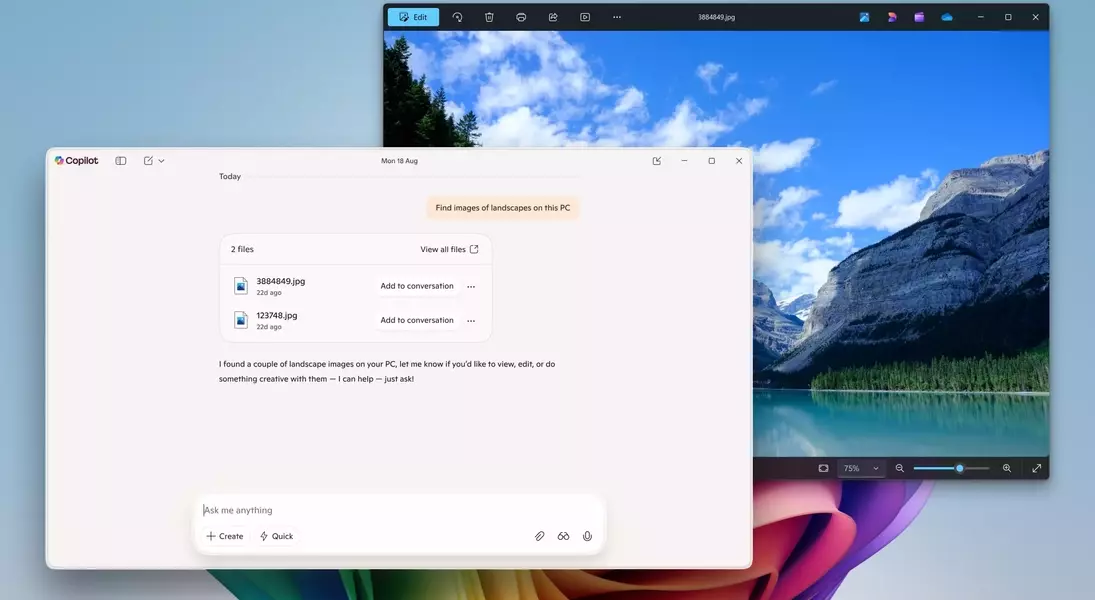
Microsoft's latest Windows 11 update is set to revolutionize how users interact with their digital assets through an advanced AI-driven file search within the Copilot app. This innovative feature moves beyond the limitations of traditional keyword-based searches, enabling users to employ natural, descriptive language to locate files and images stored on their devices. For instance, instead of remembering a precise file name, a user could simply ask Copilot to "find the document with the chicken tostada recipe," and the AI would intuitively identify and retrieve the relevant content. This semantic search capability significantly streamlines the process of information retrieval, making it quicker and more effortless for users to access the data they need without having to recall specific metadata like creation dates or file types. It represents a major step towards a more intelligent and conversational computing experience, where the system understands user intent rather than just explicit commands.
This enhancement marks a pivotal moment in the evolution of desktop search, offering a level of convenience previously unavailable. Unlike existing search functionalities that typically rely on exact matches or basic filters, the new AI search within Copilot leverages sophisticated artificial intelligence models to understand the context and meaning behind user queries. This allows for a more flexible and human-like interaction with the file system, reducing the time and effort spent in searching for specific items. Furthermore, this capability extends to various file types, including documents, spreadsheets, presentations, and even images, making it a versatile tool for professionals and casual users alike. By transforming the search process into a more intuitive, conversational exchange, Microsoft aims to boost user productivity and satisfaction, allowing individuals to focus more on their tasks and less on the mechanics of file management. The integration of this semantic search directly into the Copilot application reinforces its role as a central, intelligent assistant within the Windows ecosystem.
Intuitive Guided Assistance and Streamlined Access
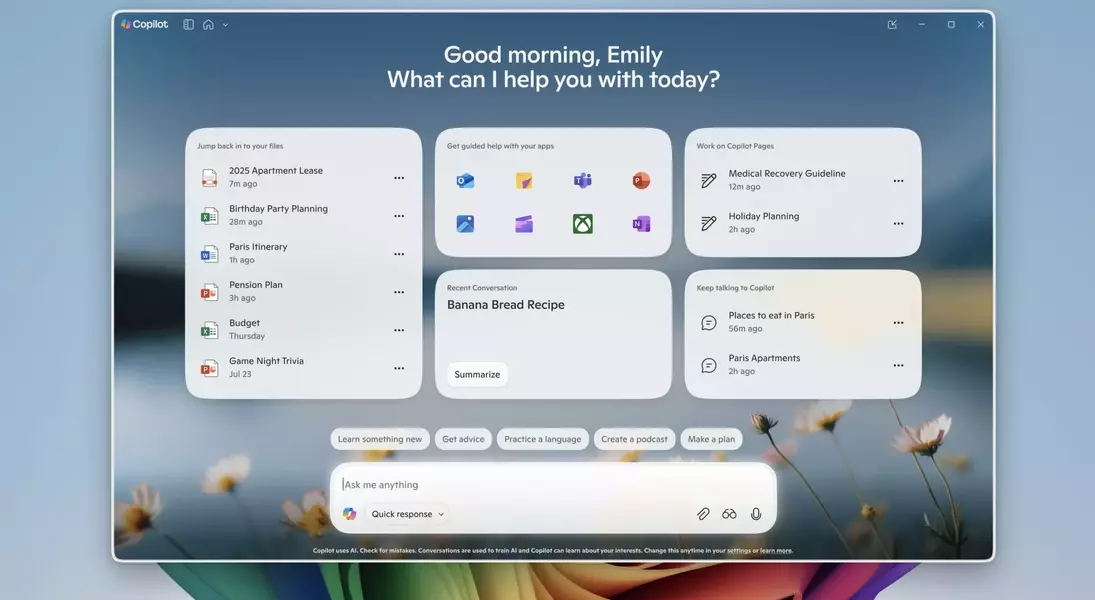
Beyond advanced file search, the Windows 11 Copilot update introduces a more intuitive and streamlined user experience, particularly through a revamped home interface and an innovative 'Vision' mode for guided assistance. The new Copilot home screen is designed to act as a personalized hub, intelligently surfacing recently accessed applications, documents, and ongoing conversations, effectively anticipating user needs and providing quick shortcuts to frequently used items. This proactive approach to content presentation aims to minimize navigation time and enhance overall workflow efficiency. A standout feature is the integration of 'Copilot Vision' sessions, which can be initiated directly from the 'guided help' section. When a user selects an application, Copilot Vision intelligently scans the entire screen content, offering real-time, context-aware guidance to help users navigate complex tasks or understand unfamiliar interfaces within that specific application. This visual understanding greatly simplifies troubleshooting and learning new software functionalities.
This refined Copilot experience extends to seamless image interaction, allowing users to upload recent photos directly to the AI assistant for immediate analysis or information retrieval. By selecting a picture from the left panel, users can then query Copilot for details, potentially asking for object identification, contextual explanations, or even creative suggestions related to the image. This feature further solidifies Copilot's position as a versatile assistant capable of understanding and processing both textual and visual information. The collective aim of these updates is to foster a more integrated and intelligent environment where the operating system adapts to the user's habits and provides assistance proactively. This new paradigm ensures that whether users are searching for a specific file, seeking help with an application, or exploring an image, Copilot is readily available to offer smart, context-rich support, enhancing both productivity and the overall user experience within Windows 11.
