
Embark on an exhilarating journey through the wilderness in Outbound, a captivating mobile base-building adventure that supports up to four players. While the allure of shared exploration is strong, cooperative play isn't immediately accessible. This comprehensive guide will navigate you through the initial steps of unlocking multiplayer functionality, seamlessly inviting your companions, and understanding the nuances of the game's progression system. Prepare your van, gather your crew, and set forth into the wild with confidence, as we chart a course for your unforgettable shared escapades.
Multiplayer in Outbound offers a dynamic way to experience the game's unique blend of survival and creativity. Whether you're collaborating on building the ultimate mobile sanctuary or venturing out to uncover hidden resources, having friends by your side enhances every aspect of the journey. This guide ensures that you and your team are well-equipped to face the challenges and enjoy the camaraderie that Outbound's co-op mode has to offer, making your wilderness adventure truly memorable.
Setting Up Your Cooperative Adventure in Outbound
Before you can invite friends to join your mobile base-building escapade in Outbound, you'll need to complete a brief introductory sequence. This tutorial, which takes only a few minutes, familiarizes you with the core mechanics and prepares your camp for the arrival of fellow adventurers. The moment you open the gate to depart your initial camping spot, multiplayer becomes available, signaling the start of your shared journey. The initial setup involves driving to a designated campsite, establishing your base by deploying the van's facilities, gathering essential starting resources from a nearby chest, and igniting a campfire for warmth and utility. Accessing the terminal allows you to acquire blueprints for basic tools, which are crucial for early game progression. Utilizing scrap metal found nearby, you'll craft a wrench at your van's workbench, enabling you to clear the barrier that obstructs your path. Once these steps are completed, a notification will appear, confirming that co-op is now active and ready for your friends to join.
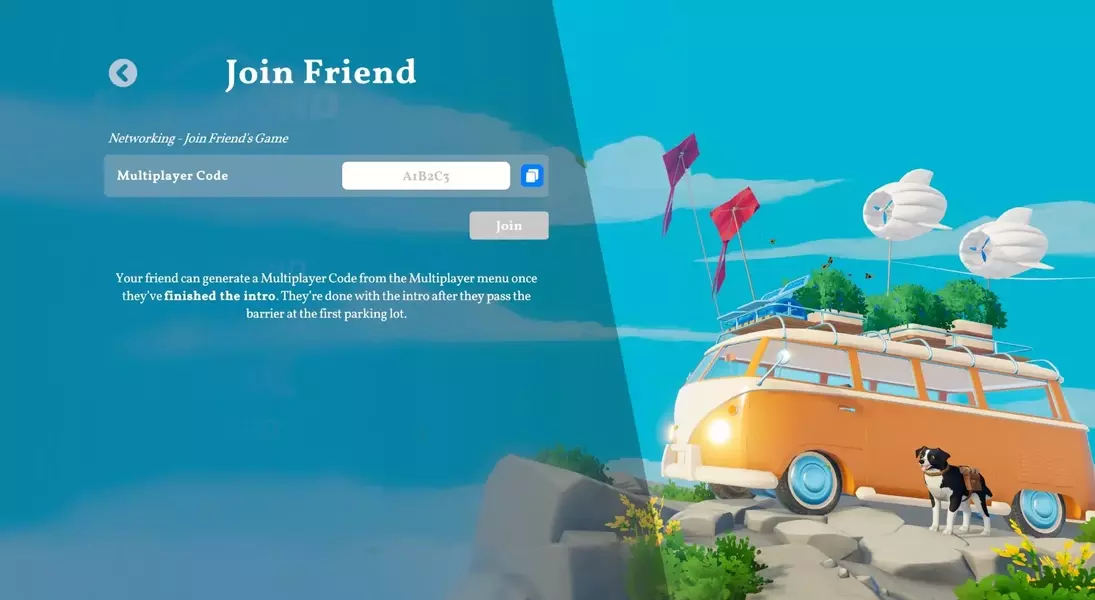
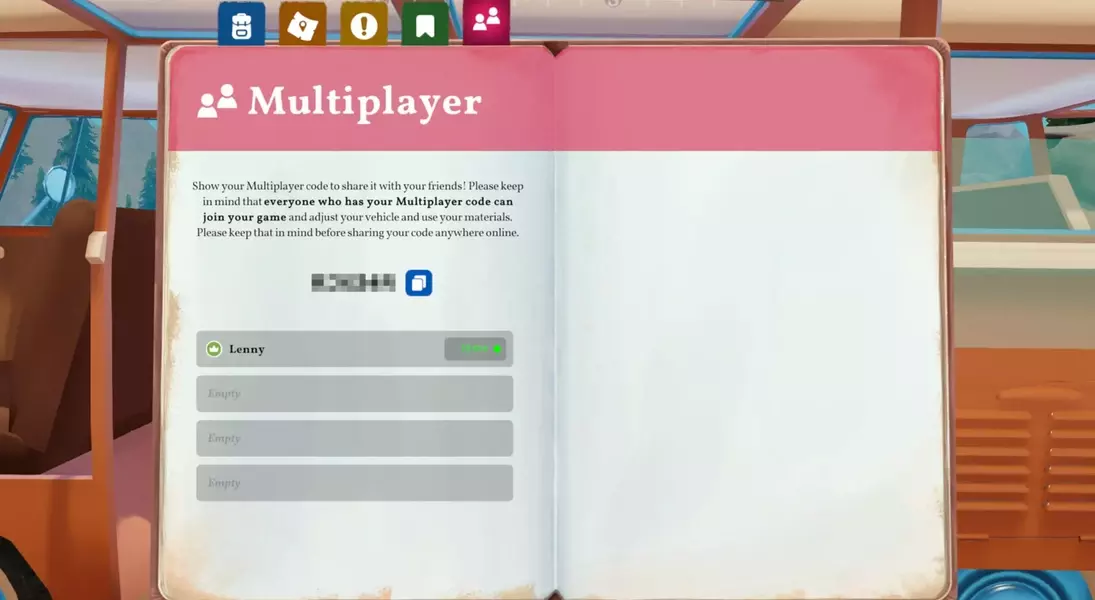
The process of initiating multiplayer in Outbound is designed to be straightforward, allowing players to quickly transition from solo play to cooperative exploration. The tutorial serves as a foundational experience, teaching you how to manage your resources, craft necessary items, and understand the environment. Once the barrier is removed and the game announces multiplayer readiness, you can proceed to the in-game menu to retrieve your unique lobby code. Sharing this code with up to three friends will enable them to join your session directly from the main menu's "Join Friend" option. This seamless integration ensures that you can rapidly assemble your crew and begin collaborating on building your mobile haven, venturing into the wilderness, and tackling challenges as a unified team, enhancing the overall immersion and enjoyment of your Outbound experience.
Navigating Shared Progress and Inviting Friends
Inviting friends to your Outbound adventure is a simple process, primarily revolving around a unique multiplayer code. The host of the session, who is the player whose save game will dictate the world's progress, initiates the invitation. By pressing the Tab key, players can access the in-game menu and locate the multiplayer icon situated on the far right. Selecting this option reveals the host's unique multiplayer code, which can then be shared with up to three companions. These friends will use this code within the main menu's 'Join Friend' feature to seamlessly enter the host's game world. It's important to note that progression in Outbound is tied to the save file itself, rather than individual characters. This means any downloads, upgrades, or discoveries made while playing in a hosted session will remain within that specific save. Consequently, these advancements will not transfer to your personal characters or separate van setups if you play alone or join a different host.
Understanding how progression works is crucial for a harmonious cooperative experience. When joining a friend's game, players will create a new character specifically for that shared save. While tool and recipe unlocks are universally shared within the host's game, ensuring that everyone can craft newly discovered items, the save file's ownership by the host implies that continuous progression is dependent on their online status. Therefore, if the host is not available, friends cannot continue the shared journey from the established point. This system encourages consistent collaboration within a dedicated group, where the host's availability facilitates the collective advancement of the mobile base and ongoing exploration. Careful planning and communication among team members regarding game sessions and objectives will maximize the enjoyment and efficiency of your cooperative wilderness expeditions in Outbound.
