Microsoft's PowerToys collection is receiving a substantial upgrade, bringing two major functionalities that Windows 11 users have long desired. This update focuses on enhancing user experience by integrating smart customization options and addressing common operational challenges within the operating system. These new features are poised to elevate the utility of Windows for a broad spectrum of users, from casual to power users, by automating routine tasks and streamlining system interactions.
Details of the Latest PowerToys Enhancements
On September 3, 2025, Microsoft unveiled the 0.94 release of its acclaimed PowerToys suite, introducing groundbreaking features designed to significantly improve the Windows 11 experience. Among the highlights is a pioneering utility that allows for the automatic toggling between light and dark modes. This intelligent system can be configured to switch themes based on a user's personalized schedule or align with local sunrise and sunset times, a convenience long enjoyed by mobile operating system users and now seamlessly integrated into Windows. This eliminates the need for manual adjustments, providing a more fluid and visually adaptive interface throughout the day.
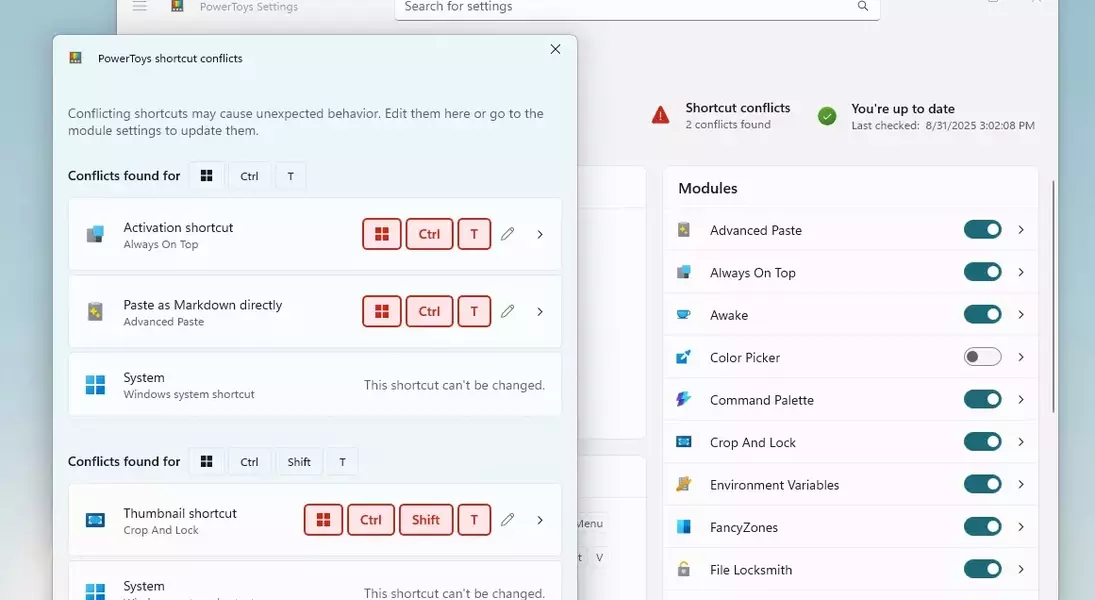
Furthermore, this update addresses a critical pain point for power users: keyboard shortcut conflicts. The new PowerToys module incorporates an innovative detection system that identifies conflicting keybindings across Windows and various PowerToys modules. This intelligent tool visually highlights any overlaps in red, enabling users to swiftly reassign shortcuts and prevent unintended actions, thereby enhancing workflow efficiency and system responsiveness. According to Niels Laute, a senior product manager at Microsoft, future updates will also bring a redesigned Keyboard Manager user interface, further refining the customization experience for keyboard enthusiasts.
Beyond these prominent additions, PowerToys continues to offer a rich array of functionalities, including Advanced Paste, Always on Top, FancyZones for desktop organization, and the Command Palette launcher. Users can access these powerful tools by downloading the latest PowerToys release directly from Microsoft's GitHub page.
The introduction of these features through PowerToys signals a proactive approach from Microsoft in responding to user feedback and enriching the Windows ecosystem. While it might seem surprising that automatic theme switching, a feature prevalent in other operating systems for years, is being introduced via a separate utility rather than being native to Windows 11, its arrival is nonetheless a welcome development. From a user's perspective, this update truly feels like Microsoft is listening and delivering tangible improvements that enhance daily productivity and personalization. It prompts reflection on the agile development model of PowerToys, which allows for quicker deployment of innovative solutions compared to the more protracted Windows update cycles. This strategy could serve as a blueprint for addressing other long-standing feature requests, fostering a more dynamic and user-centric evolution of the Windows operating system. It underscores the importance of community-driven tools in filling functional gaps and continually pushing the boundaries of what a modern OS can offer.
