
This guide provides clear, step-by-step instructions for establishing a multiplayer session in Hytale, ensuring players can seamlessly connect with friends. It details the process of hosting a game world, generating a unique share code, and enabling privacy settings. Additionally, it offers a straightforward method for friends to join an existing session using this code, making the multiplayer experience accessible and enjoyable for everyone.
Unlock Shared Adventures: Your Easy Guide to Hytale Multiplayer Fun
Embarking on Collaborative Journeys: Understanding Hytale's Multiplayer Mechanics
Hytale's multiplayer functionality, while not immediately obvious from the main menu, is quite intuitive once understood. It allows players to enjoy the full game experience alongside companions, transforming solo exploration into shared adventures. This guide focuses on direct friend-to-friend connections, distinct from the more complex dedicated server setups detailed in Hypixel's Hytale server manual, which most players won't require.
Initiating Your Shared World: Steps for Hosting a Hytale Session
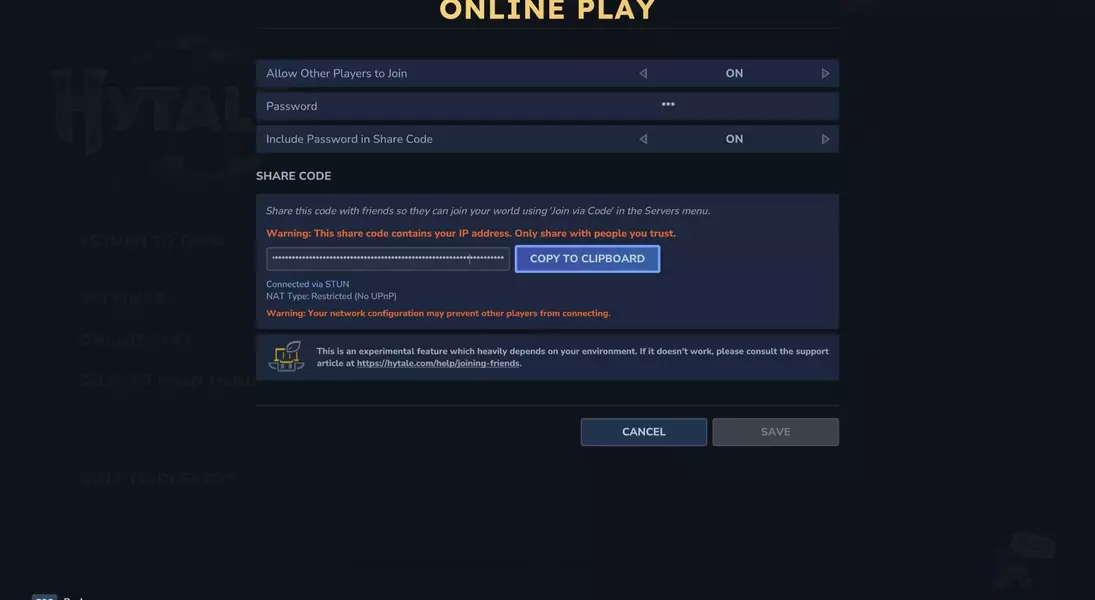
To enable friends to join your Hytale world, the host must configure their game settings appropriately. This involves creating a new world, as if preparing for a single-player journey. Once the world is established, access the pause menu and navigate to the 'online play' option. Here, activate the 'allow other players to join' setting. For added privacy, you can implement a password, which can be automatically embedded into your share code. After confirming these selections by clicking 'save,' a unique share code will be generated. It's crucial to exercise caution when sharing this code, as it contains your IP address and should only be distributed among trusted individuals.
Connecting with Companions: How Friends Can Join Your Hytale Game
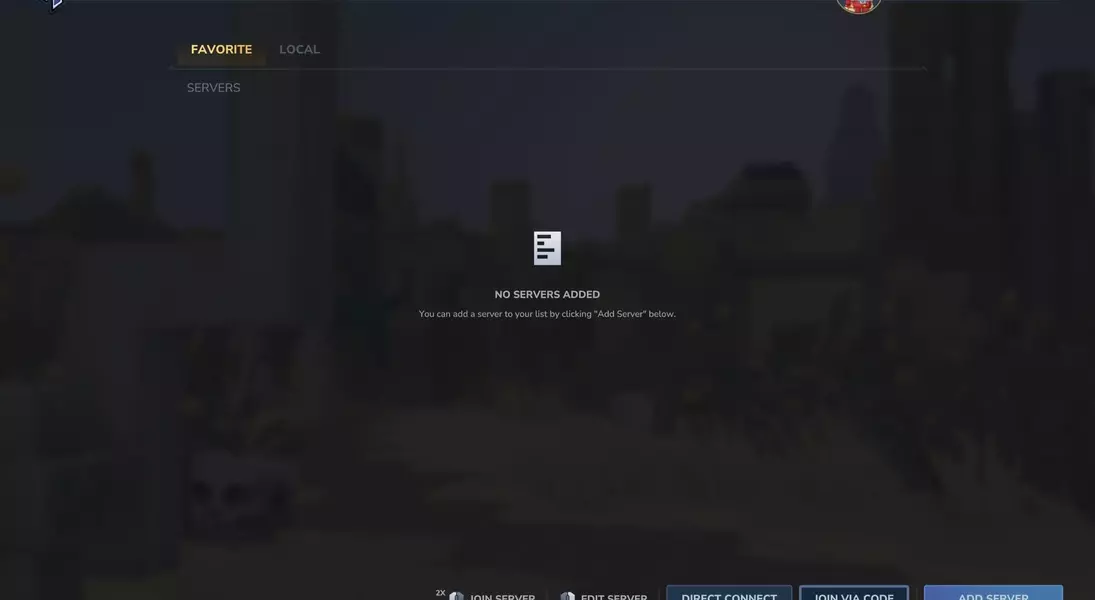
For friends to enter your hosted Hytale world, they will need the share code you've provided. From the game's main menu, they should select the 'Server' page. Within this section, locate and click the 'join via code' option, typically positioned in the bottom right corner. Here, they will paste the share code. If the host has established a password that wasn't automatically included in the share code, friends will need to input this separately. Finally, by clicking 'connect,' they will be able to join your world and begin their adventure alongside you.
Dynamic Multiplayer: Flexibility to Adapt Your Gaming Experience
The beauty of Hytale's multiplayer system lies in its adaptability. Once your server is properly configured and your friends have successfully joined using the provided code, you're all set to explore together. Should you wish to switch between single-player and multiplayer modes, you have the flexibility to enable or disable the multiplayer option at any point during your gameplay. This means you can seamlessly transition from a solo journey to a collaborative quest, even if you've already invested hours into your world, ensuring a versatile and engaging gaming experience.
