



Hytale, the highly anticipated sandbox title, offers players an extensive range of console commands to customize their gaming experience. This guide delves into the various commands available, covering everything from administrative functions and character modifications to world settings and item generation. It provides a comprehensive overview for both single-player and multiplayer server management, enabling users to fine-tune their gameplay, create unique scenarios, and enhance their creative endeavors within the game's expansive world. While Hytale is still in early access, these commands offer a robust foundation for an enriched gaming journey.
Detailed Breakdown of Hytale Console Commands for Enhanced Gameplay
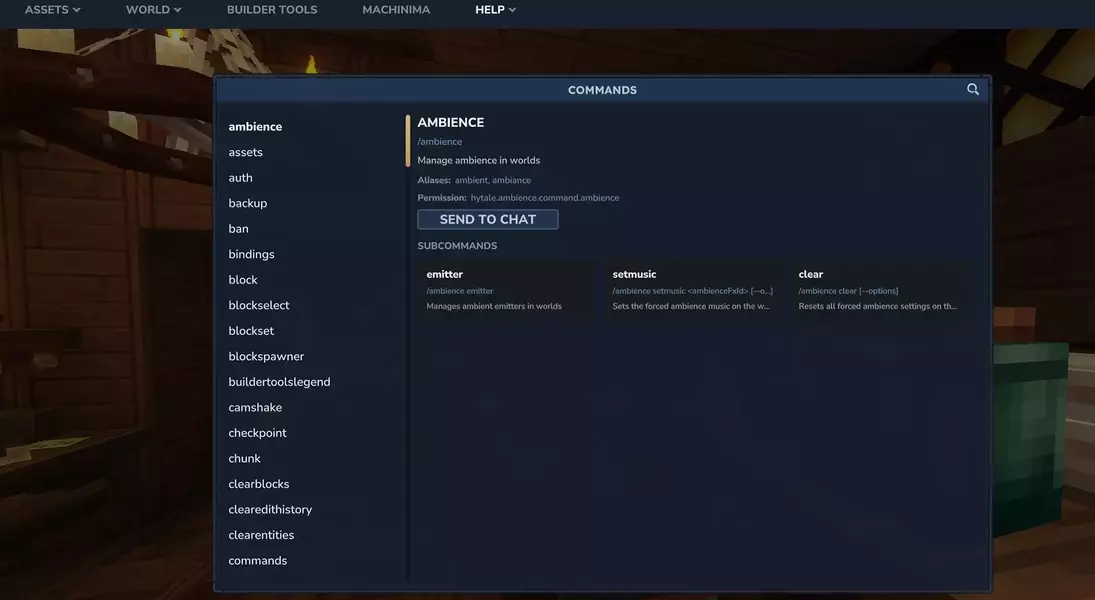
To access Hytale's command console, players simply press the 'Enter' key, opening an in-game chat interface where commands can be input. Before executing most commands, it's crucial to establish administrative privileges. This is achieved by typing '/op self' to grant yourself admin status, or '/op add [player name]' to bestow these rights upon another player, for example, '/op add SomeGuy'. Conversely, administrative access can be revoked using '/op remove [player name]'. Administrators can also use the '/help' command to view a list of available commands and their parameters.
For those looking to streamline their game, several quality-of-life commands are available. Players can instantly restore their health and stamina with '/heal' or replenish their signature energy gauge using '/fillsignature'. To quickly unlock all narrative elements, '/memories unlockall' is a convenient option. Navigation across the expansive world is made easy with teleportation commands: '/tp home' sends you to your designated home point, while '/warp set [name]' allows you to establish custom warp locations, such as '/warp set MyBase'. You can then return to these spots with '/warp go [name]'. A list of all saved warps can be displayed using '/warp list'. Time manipulation is also at your fingertips; '/noon' sets the in-game time to midday and pauses it, ideal for construction or scenic views.
Server administrators have a suite of powerful tools at their disposal for managing player interactions and server integrity. Commands such as '/kick [player]' or '/ban [player] --reason' provide control over player presence, while '/unban [player]' can restore access. The server's whitelist can be managed with '/whitelist enable', '/whitelist disable', '/whitelist add [player]', and '/whitelist remove [player]'. Monitoring server activity and status is possible with '/who' to list active players, '/whereami [player]' for location details, and '/whoami [player]' for player identification information. Server maintenance commands include '/backup' for creating universe backups and '/server dump' to generate a detailed report of the server's state.
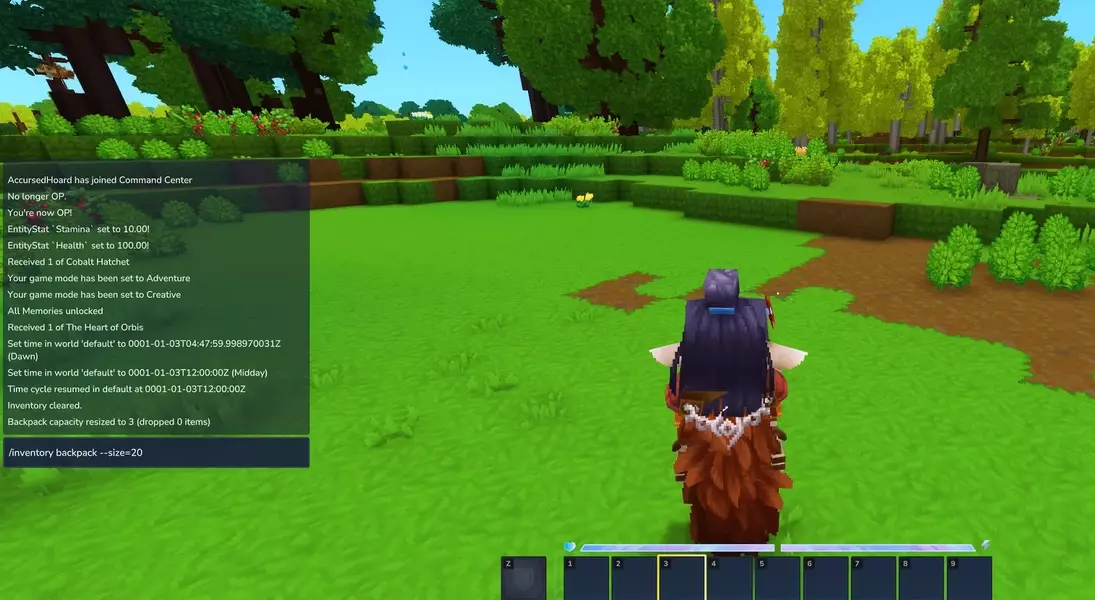
For character management, players can resize their inventory with '/inventory backpack --size=[#]', clear all items with '/inventory clear', or even view another player's inventory using '/inventory see [player]', for instance, '/inventory see SomeGuy'. The game also allows for direct manipulation of character health, such as reducing it to one point with '/neardeath' or dealing a specific amount of damage with '/damage [player] --amount=[#]', e.g., '/damage SomeGuy --amount=20'.
World alteration and teleportation extend beyond personal warps. Players can instantly move to the world spawn with '/spawn' or ascend to the highest point above them with '/tp top'. The game mode can be switched between creative and exploration with '/gamemode creative' and '/gamemode exploration' respectively. Map functionalities include '/worldmap reload' to refresh the map, '/worldmap discover' to reveal all zones, and '/worldmap clearmarkers' to erase all existing markers. Time and weather can also be precisely controlled, with commands like '/time dawn', '/time midday', '/time dusk', '/time midnight', and '/weather reset' to revert to default conditions.
Finally, item generation is a cornerstone of the Hytale command experience. Using '/give [item ID]' or '/give [item ID] --quantity=[#]', players can spawn an array of resources. For example, '/give Tool_Pickaxe_Cobalt' grants a cobalt pickaxe, and '/give Ingredient_Bar_Copper --quantity=100' provides 100 copper bars. Administrators can also grant items to other players with '/give [player] [item ID] --quantity=[#]', like '/give SomeGuy Ingredient_Stick --quantity=10'. A diverse array of item IDs are available, covering raw ores (e.g., Ore_Copper, Ore_Mithril), ingots (e.g., Ingredient_Bar_Iron, Ingredient_Bar_Gold), gems (e.g., Rock_Gem_Emerald, Rock_Gem_Voidstone), logs (e.g., Wood_Oak_Trunk, Wood_Azure_Trunk), seeds (e.g., Plants_Seeds_Carrot, Plants_Seeds_Wheat), fruits (e.g., Plant_Fruit_Apple, Plant_Fruit_Pinkberry), and various tools and crafting benches (e.g., Tool_Repair_Kit_Iron, Bench_Alchemy, Vehicle_Wood_Boat).
The comprehensive control offered by Hytale's console commands transforms the game into a versatile platform for creativity and exploration. While still in its early access phase, the existing commands allow players to bypass conventional gameplay loops, experiment with building mechanics, and manage server environments with unprecedented flexibility. This depth of customization not only enhances individual player enjoyment but also fosters a dynamic community where unique worlds and experiences can be shared. As the game evolves, so too will the potential of these powerful tools, promising an even richer and more engaging future for Hytale players.
