
In the fiercely competitive world of esports, where every millisecond can dictate victory or defeat, optimizing system performance is paramount. A prevalent concern among a segment of competitive gamers revolves around whether communication software like Discord, a staple for team coordination, inadvertently compromises game performance due to its default process priorities. While not a widespread phenomenon, discussions on social media platforms highlight suspicions that Discord's elevated process settings could be consuming excessive CPU cycles, potentially leading to reduced frame rates and inconsistent frame delivery, known as frame time spikes. This exploration aims to shed light on these claims through practical observation and analysis, offering insights into Discord's operational behavior and its real-world impact on high-stakes gaming scenarios.
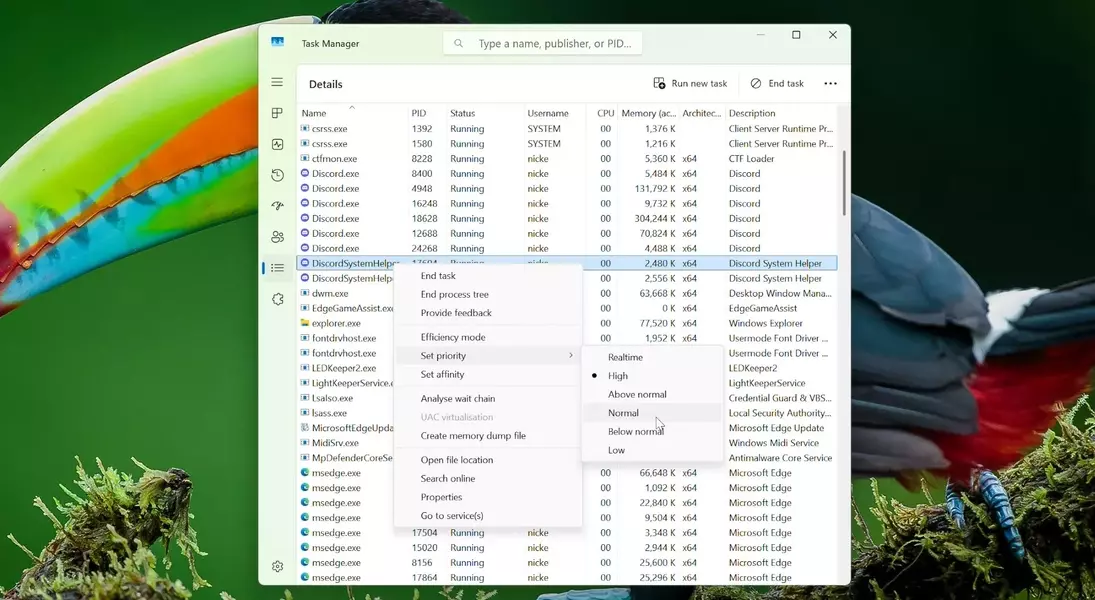
A 'process priority' is a system attribute that informs the operating system about the allocation of CPU time and resources to a particular application relative to other active processes. Setting a program to 'Normal' priority ensures it shares resources equitably, without undue precedence over other tasks. However, operating systems allow for higher priority levels such as 'Above Normal,' 'High,' and 'Realtime,' which compel the system to prioritize specified applications. Interestingly, a standard Discord installation on Windows typically initiates eight distinct processes. While a majority of these processes operate at 'Normal' priority, a single process often defaults to 'Above Normal,' and two critical processes, identified as 'DiscordSystemHelper,' are commonly assigned 'High' priority. This configuration has sparked debate among gamers regarding its potential to impact game performance.
To investigate these assertions, a series of controlled tests were conducted using Counter-Strike 2, a popular esports title, on a high-end system featuring a Ryzen 9 9900X processor and an RTX 5090 graphics card. The game was configured for 1080p resolution with low graphics settings, FSR Performance upscaling, and Nvidia Reflex enabled, aiming to create a scenario where performance fluctuations would be easily discernible. Comparative analyses were performed under three conditions: with Discord completely closed, with Discord running in the background at its default priority settings, and with all Discord processes manually adjusted to 'Normal' priority. The results, visualized through frame time graphs and D3D11 performance metrics, indicated a negligible difference across all three test conditions. Although a slight increase in frame times—on the order of a single millisecond—was observed when Discord was active, this variance is statistically insignificant for most users.
While this single test on a specific setup and game may not represent all possible scenarios, the findings suggest that Discord's default process priorities have a minimal impact on gaming performance for the average user. Professional esports players, where hardware setups are often standardized, would likely experience an even playing field regardless. Nevertheless, for those who remain concerned about every conceivable optimization, adjusting Discord's process priority is a straightforward procedure. Users can access the Task Manager, navigate to the 'Details' tab, locate Discord's processes, and manually set their priority to 'Normal.' However, it is crucial to exercise caution: attempting to boost a game's priority to 'High' or, more critically, 'Realtime,' is generally ill-advised. Such aggressive prioritization can lead to system instability and is unlikely to yield significant performance gains, as Discord itself is not particularly CPU-intensive. If Discord's background operation noticeably impedes system performance, it might indicate underlying issues with the PC's overall hardware or software configuration rather than a flaw in Discord's design.
